Gradespace Tutor
v0.2.0For tutoring centres and independent tutorsYour tutoring website, lesson booking and timetable. One payment.
Tutor profiles, online booking with each tutor’s real free times and every email about a child sent to the parent, in a design made for tutoring.
from£69one-time · incl. VAT where applicable
Demo resets every night.
- One-time price
- Lifetime updates
- Staging sites are free
- 14-day money-back
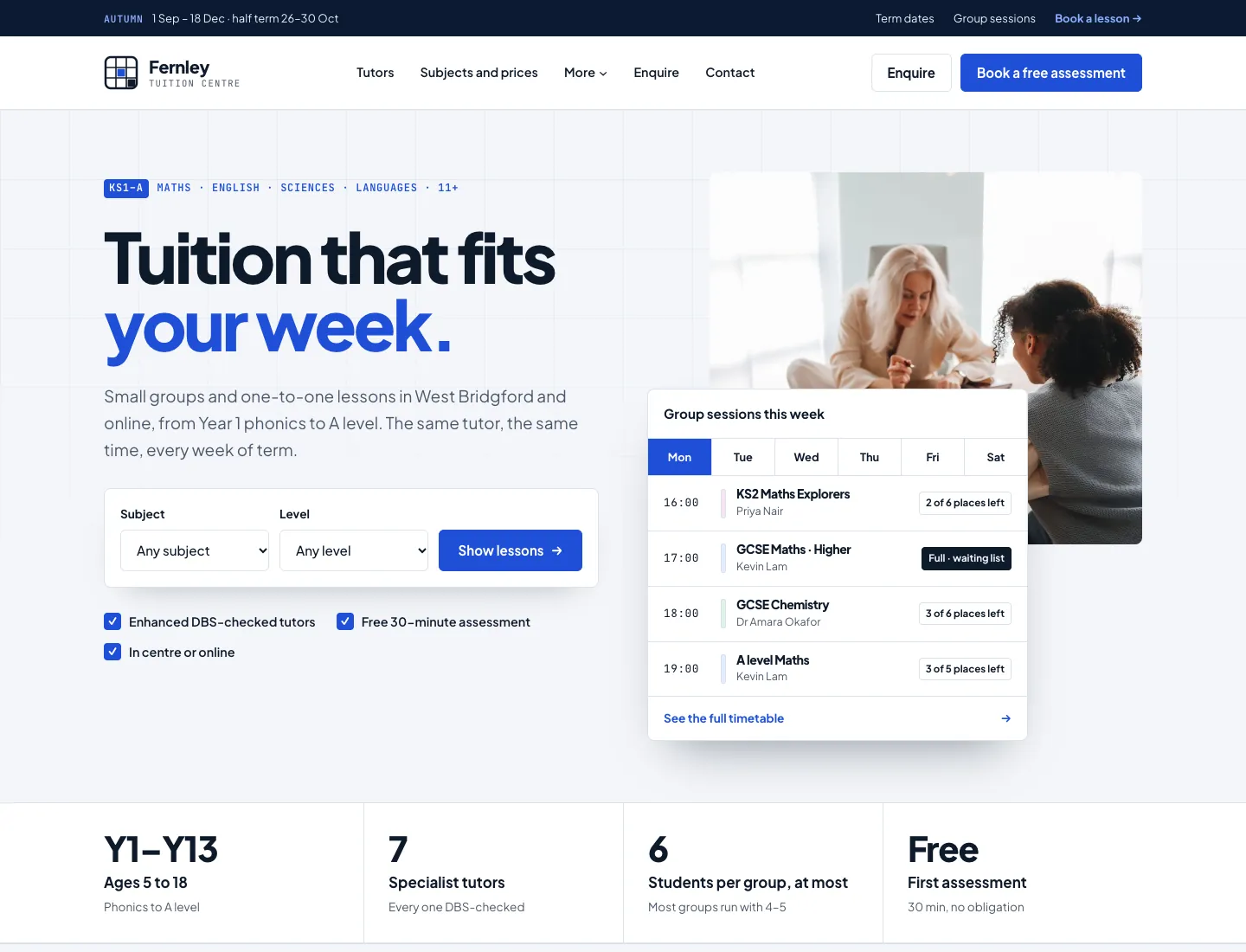
Five designs, seven colour palettes each
Every design has all the same features. Pick one to see it, then open any page larger. Screenshots use the setup wizard’s sample content.
CampusDefault
For tuition centres with a busy week: a visible grid, square corners, numbered sections, a subject and year-group finder, the weekly timetable as a grid tinted by subject, and a subjects × levels table.
Showing the Campus design
More pages
Book a lesson
Weekly until the end of term (Pro)
Our tutors
A tutor’s page
Group sessions (Pro)
Colour palettes for Campus
Each design has its own palettes, made for it. Change them any time in Site Settings → Design & colours.
- Cobalt
- Teal
- Emerald
- Plum
- Coral
- Navy & red
- Chalkboard
Sample photos: Pexels photographers
The screenshots show the kit’s sample photos from Pexels, used under the Pexels License. The kit credits them on its Photo credits page; replace them with your own.
- Teacher discussing her lesson with her student, Polina Tankilevitch
- Diligent ethnic girl writing notes while tutor giving lesson online, Katerina Holmes
- A girl attending an online class, Annushka Ahuja
- Person writing on a graphic notebook, Péter Miklós
- A person writing on white notebook, olia danilevich
- Spiral notebook pencils and paper clips flatlay, olia danilevich
- Person studying and writing notes on paper, Kaboompics
- Different laboratory glassware with colored liquid, Pavel Danilyuk
- Assorted color crayons, Rahul Pandit
- Hands of a person on white wooden surface surrounded by toy blocks, Ksenia Chernaya
- Colorful wooden stacking toy collection, Sóc Năng Động
- People at a library, Tima Miroshnichenko
- Colorful stack of hardcover books on dark background, Marta Branco
- Woman wearing button up top, Pavel Danilyuk
- A bearded man wearing eyeglasses, Kampus Production
- Portrait photo of smiling woman in teal top carrying folders while standing in front of white background, Andrea Piacquadio
- Portrait of elderly woman in brown blazer holding a notebook, Pavel Danilyuk
- Confident teacher in classroom with chalkboard, Anil Sharma
- Teacher standing beside a blackboard, Yan Krukau
- Professor smiling in front of blackboard with equations, Vitaly Gariev
- Students Studying Together while Looking at the Screen of a Laptop, Yan Krukau
- Portrait of a Smiling Young Man in Glasses, Alfredo Dacosta
What it does
Tutor profiles they keep up to date
Subjects, levels, exam boards, online or in person, rates, qualifications, hours and days away, edited by each tutor. The office keeps the name and the DBS note: “DBS certificate seen by us” and the month.
Online booking with real free times
Families choose a lesson, a tutor or “any tutor”, a day and a time. Only times when the tutor teaches, isn’t away and has a gap are offered. Requests or instant, reminders the day before and a link to move or cancel.
Children and their parents
A child’s booking needs a parent or guardian’s name, email and phone, and every email about the child’s lessons goes to the parent. Trial lessons once per student, and brothers and sisters each get their own.
Weekly until the end of term (Pro)
Families tick “Repeat weekly until the end of term”: every week is booked together, or none if one has gone, with half terms and holidays left out. One email and one calendar file for the series, and one page to change or cancel one lesson or all of them.
Groups, the register and packages (Pro)
Group sessions with places and a waiting list where the first in line gets a freed place, a weekly timetable within your term dates, an attendance register with a spreadsheet download, and lesson packages counted down as lessons are booked.
Classes and a student area (Pro)
Classes with a short code like GCSE-001, a number of places and their tutors, and new enquiries and bookings put in a class automatically if you like. Students you invite choose their own password with a one-time link and sign in to a student area with their next lessons, their class and their details. Tutors see only their own classes.
Five designs and real photos
Campus, Notebook, Bright Minds, Scholar and Academy, each with seven colour palettes, and sample photos from Pexels with the photographers credited.
What’s included
One payment, a lifetime licence and every future update. Each tier includes everything in the one before.
Starter
£69one-time
incl. VAT where applicable · 1 live website · lifetime updates
- The Gradespace Tutor theme with its designs and colour palettes
- Tutors with subjects, levels and exam boards, lesson types and prices, online booking with reminders and move or cancel links, students and parents, enquiries, and on Pro group sessions, a weekly timetable in term dates, a register, lesson packages, classes and student accounts
- Setup wizard with starter pages and menu
- Legal pages (privacy, cookies, terms) to start from
- Cookie consent
- Lifetime updates
Pro
Most chosen£139one-time
incl. VAT where applicable · 1 live website · lifetime updates
- Everything in Starter
- Staff access (roles and abilities)
- Email log
- Site stats without cookies
- Choose to hide the “Website by Gradespace” sign-in credit
- Group sessions with places and a waiting list that moves up by itself
- A weekly timetable within your term dates, and lessons booked weekly until the end of term
- An attendance register tutors take on their phone, with a spreadsheet download
- Lesson packages bought online or at the desk, counted down as lessons are booked
- Payment before lessons, and private calendar feeds for the office and each tutor
- Classes with a short code (GCSE-001) and places, and student accounts with a student area for their lessons and class
Agency
£389one-time
incl. VAT where applicable · 5 live websites · lifetime updates
- Everything in Pro
- 5 live websites on one licence
- White-label sign-in page (your own heading and text)
Already have a Gradespace Tutor licence? Upgrade it from your licences page and pay only the difference.
Want us to set it up for you?
We can install Gradespace Tutor on your hosting, or set up the whole site for you.
Done-for-you installation
from £99
Final price agreed before we start · incl. VAT where applicable
We install the kit on your hosting, run the setup wizard with your details and hand it over ready to use.
Complete setup and customisation
from £299
Final price agreed before we start · incl. VAT where applicable
Everything in installation, plus your content, bookings and forms set up, staff training and 30 days of help.
The kit licence is bought separately: add a Starter or Pro licence to either service.
Installing Gradespace Tutor
Gradespace Core, then the plugin, then the theme, and a setup wizard does the rest.
Questions
Can families book the same lesson every week?
How are children’s details looked after?
Can families pay online?
What do tutors see when they sign in?
Is it a one-off payment?
What do I need to run it?
What counts as a website?
Can you install it for me?
Can I change the design later?
How do updates work?
Can I upgrade later?
Refunds
Something else? Get in touch.
Other kits
- Gradespace ClinicClinics and opticians
- Gradespace SalonSalons, barbers and spas
- Gradespace MusicMusic schools and tutors
- Gradespace DrivingDriving schools and instructors
- Gradespace ChurchChurches with one or many congregations
- Gradespace CharityCharities and community organisations
- Gradespace VenueWedding, event and meeting venues
- Gradespace TradesBuilders, plumbers, electricians and other trades
- Gradespace GroupGroups of businesses under one owner