Getting started

Install your WordPress kit

Three files, installed in order, then a short setup wizard. No technical knowledge needed.

Before you start

    • A WordPress website (WordPress 6.8 or later, PHP 8.0 or later) on any ordinary host.
    • An administrator account on it, so you can add plugins and themes.
    • Your licence key, from your receipt email.
    • The three .zip files from your licences page (choose Downloads). Leave them zipped: WordPress wants them that way.

Install in this order

Do these in your WordPress admin (your website’s address followed by /wp-admin). Older versions of WordPress say “Add New” instead of “Add New Plugin” and “Add New Theme”.

  1. Step 1: Install Gradespace Core

    gradespace-core-….zip

    Core is free and every kit runs on it, so it always goes first.

    PluginsAdd New PluginUpload PluginInstall NowActivate Plugin

    The setup wizard may open straight away. Leave it for now: you’ll come back to it in step 4.

  2. Step 2: Install your kit’s plugin

    gradespace-<your kit>-….zip, e.g. gradespace-clinic-….zip, gradespace-tutor-….zip or gradespace-charity-….zip

    The plugin holds your kit’s features: bookings, sermons, lessons, quotes, enquiries and so on. WordPress won’t activate it without Core.

    PluginsAdd New PluginUpload PluginInstall NowActivate Plugin

  3. Step 3: Install your kit’s theme

    gradespace-…-theme-….zip

    The theme is the design. You can change the design and colours later without losing anything.

    AppearanceThemesAdd New ThemeUpload ThemeInstall NowActivate

  4. Step 4: Run the setup wizard

    It asks a few questions about your business and adds starter pages and a menu. If it doesn’t open by itself, click Continue setup on the Dashboard. You can run it again later from your kit’s Settings (Run setup again).

    DashboardContinue setup

  5. Step 5: Add your licence key

    Paste the key from your receipt email and click Activate. That switches on updates, and Pro or Agency features if your licence includes them. The same screen is also under your kit’s menu: Settings → Licence.

    SettingsGradespace licencePaste your keyActivate

    Before you add a key the kit runs in Starter mode, so you can try it, but it gets no updates.

That’s it: your website is ready to fill in. New versions then arrive in Dashboard → Updates.

Your kit, and a guide for your staff

The exact files for each kit, what its setup wizard asks, and a short guide your team can keep to hand. The guides are free to read and print.

Gradespace Clinic

Clinics and opticians

Your three files, in order

  1. Gradespace Core plugingradespace-core-0.8.7.zip
  2. Gradespace Clinic plugingradespace-clinic-0.3.5.zip
  3. Gradespace Clinic themegradespace-clinic-theme-0.2.2.zip

The setup wizard asks about

  • Your business
  • How people reach you
  • Opening hours
  • Services
  • Payments
  • Starter content

Afterwards everything is under Clinic in the WordPress menu, and your licence under Clinic → Settings → Licence.

The shop, pay-at-the-store and bank-transfer proofs need the free WooCommerce plugin. Bookings and patient records work without it.

Staff guide

Signing in, the Today screen, appointments and the calendar, patients and prescriptions, the shop and the till, settings and staff access.
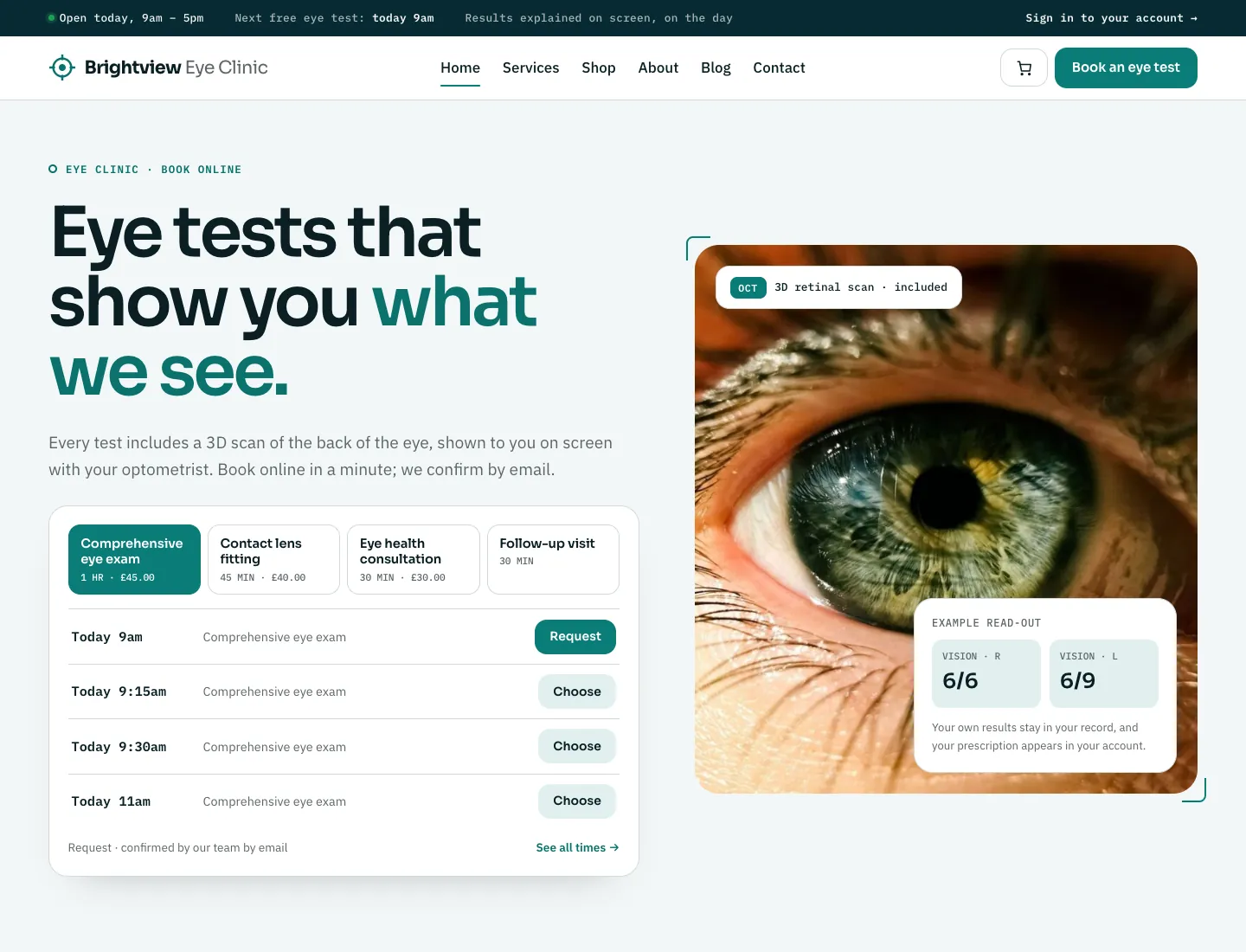

Clinic home page in the Clarity design on desktop: status strip with the next free eye test, hero “Eye tests that show you what we see.”, a slot finder with a tab per service and its next free times, and a close-up eye photo with an example read-out
After the setup wizard, with its sample content (Clarity design). Yours shows your own words and pictures.

Gradespace Salon

Salons, barbers and spas

Your three files, in order

  1. Gradespace Core plugingradespace-core-0.8.7.zip
  2. Gradespace Salon plugingradespace-salon-0.1.4.zip
  3. Gradespace Salon themegradespace-salon-theme-0.1.5.zip

The setup wizard asks about

  • Your business
  • How people reach you
  • Your salon
  • What you offer
  • Your team
  • Opening hours
  • Online booking
  • Starter content

Afterwards everything is under Salon in the WordPress menu, and your licence under Salon → Settings → Licence.

Salon needs Gradespace Core 0.7.0 or later (its booking engine and payments). Group bookings (several people at the same visit, new in Salon 0.1.1) need Core 0.8.0 or later.

Online bookings are confirmed straight away unless you untick it in Settings → Bookings. Deposits and gift vouchers (Pro) need online payments switched on in Settings → Payments: Stripe directly, or the WooCommerce checkout.

The shop needs the free WooCommerce plugin. Bookings, the diary and client records work without it.

Staff guide

Signing in, the Today screen, appointments and the diary, services and prices, the team and their hours, clients, gift vouchers and the shop, settings and photos.

Salon home page in the Blush design on desktop: hero “Care for your hair” with Book an appointment and See prices buttons, the next free time, and a photo in a tilted oval with floating petals
After the setup wizard, with its sample content (Blush design). Yours shows your own words and pictures.

Gradespace Music

Music schools and tutors

Your three files, in order

  1. Gradespace Core plugingradespace-core-0.8.7.zip
  2. Gradespace Music plugingradespace-music-0.4.3.zip
  3. Gradespace Music themegradespace-music-theme-0.2.3.zip

The setup wizard asks about

  • Your business
  • How people reach you
  • Your school
  • Instruments
  • Tutors
  • Lessons and prices
  • Opening days
  • Online booking
  • Starter content

Afterwards everything is under Music school in the WordPress menu, and your licence under Music school → Settings → Licence.

Online bookings are requests the office confirms, unless you switch on instant confirmation in Music school → Settings → Lessons.

Staff guide

Signing in, the Today screen, lesson bookings and the calendar, tutors and their hours, lesson types, students, settings and staff access.

Music school home page in the Amp design on desktop: “Start a band. Get loud.” in big capitals on near-black, Book a taster and Join a band buttons, and a glowing band photo with a record bar and waveform
After the setup wizard, with its sample content (Amp design). Yours shows your own words and pictures.

Gradespace Tutor

Tutoring centres and independent tutors

Your three files, in order

  1. Gradespace Core plugingradespace-core-0.8.7.zip
  2. Gradespace Tutor plugingradespace-tutor-0.1.6.zip
  3. Gradespace Tutor themegradespace-tutor-theme-0.1.7.zip

The setup wizard asks about

  • Your centre
  • How people reach you
  • What you teach
  • Your tutors
  • Lessons and prices
  • Opening hours
  • Online booking
  • Starter content

Afterwards everything is under Tutoring in the WordPress menu, and your licence under Tutoring → Settings → Licence.

Tutor needs Gradespace Core 0.7.1 or later. “Repeat weekly until the end of term” (Pro) needs Core 0.8.0 or later.

Online bookings are requests the office confirms, unless you switch on Tutoring → Settings → Lessons → Confirm online bookings straight away.

Term dates, half terms and holidays (Pro) go in Tutoring → Settings → Terms. The weekly timetable makes its lessons from them, and the switch for “Families can repeat a lesson weekly until the end of term” is there too (on by default).

Give each tutor a sign-in with the Tutor role and choose it under Office → Their sign-in on their profile, so they can keep their profile and hours up to date.

Payment before lessons and lesson packages bought online (Pro) need online payments switched on in Settings → Payments: Stripe directly, or the WooCommerce checkout.

Staff guide

Signing in, the Today screen, lessons and the timetable, tutors and what they see, students and parents, enquiries, group sessions, the weekly timetable and term dates, the register, lesson packages, calendar feeds and settings.

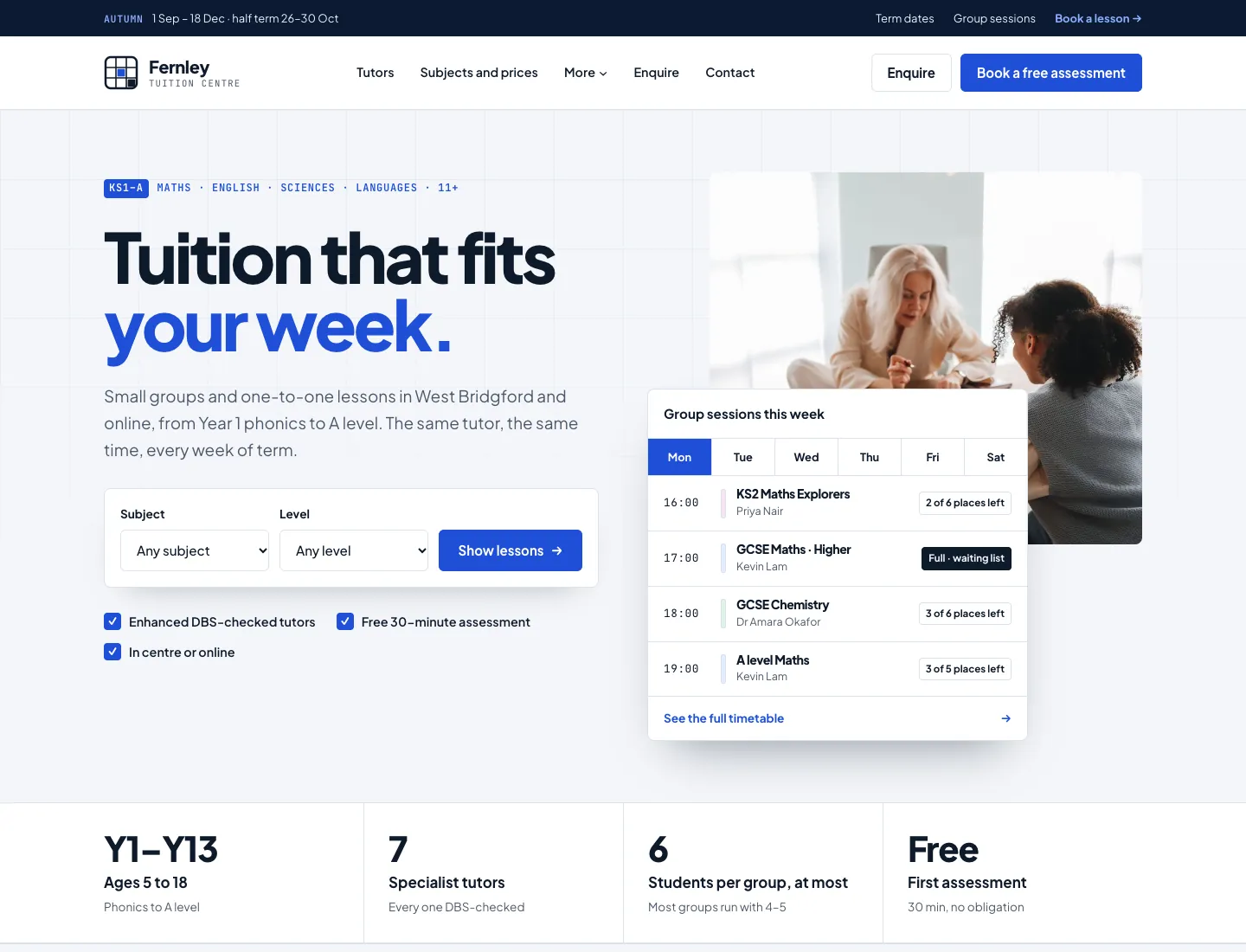
Tutor home page in the Campus design on desktop: a term notice bar, “Tuition that fits your week.” with a subject and level finder, and a card of this week’s group sessions by day with the places left
After the setup wizard, with its sample content (Campus design). Yours shows your own words and pictures.

Gradespace Driving

Driving schools and instructors

Your three files, in order

  1. Gradespace Core plugingradespace-core-0.8.7.zip
  2. Gradespace Driving plugingradespace-driving-0.1.5.zip
  3. Gradespace Driving themegradespace-driving-theme-0.1.7.zip

The setup wizard asks about

  • Your school
  • How people reach you
  • Areas you cover
  • Your instructors
  • Lessons and prices
  • Opening hours
  • Online booking
  • Starter content

Afterwards everything is under Driving school in the WordPress menu, and your licence under Driving school → Settings → Licence.

Driving needs Gradespace Core 0.8.0 or later (its booking engine, booking groups and payments).

Add the areas you cover with their postcode districts (“West Bridgford: NG2, NG12”): online booking only offers instructors who cover the learner’s pickup postcode.

Online bookings are requests you confirm under Driving school → Lessons, unless you switch on Settings → Lessons → Confirm online bookings straight away. Learners can book several lessons at once unless you switch it off there.

Block bookings and courses bought online, and payment when learners book (Pro), need online payments switched on in Settings → Payments.

Staff guide

Signing in, the Today screen, lessons and the diary, instructors and the areas they cover, learners and parents, test dates and pass stories, block bookings and courses, the learner account and the rest of the website.

Driving school home page in the Signal design on desktop: “Pass with people who know your test routes.” in heavy type, a postcode and manual or automatic finder, a photo of a lesson with a roundel counting the instructors, the next free lessons nearby on a blue road sign, and a band with the first-time pass share, instructors and areas covered
After the setup wizard, with its sample content (Signal design). Yours shows your own words and pictures.

Gradespace Church

Churches with one or many congregations

Your three files, in order

  1. Gradespace Core plugingradespace-core-0.8.7.zip
  2. Gradespace Church plugingradespace-church-0.6.8.zip
  3. Gradespace Church themegradespace-church-theme-0.4.4.zip

The setup wizard asks about

  • Your business
  • How people reach you
  • Your church
  • Where you meet
  • Service times
  • Your YouTube channel
  • Starter content

Afterwards everything is under Church in the WordPress menu, and your licence under Church → Settings → Licence.

Sermons come from your YouTube channel every hour once you paste its address or @handle. No API key is needed.

Staff guide

Signing in, the Today screen, visit and prayer requests, sermons from YouTube, events, stories and churches, settings and staff access.

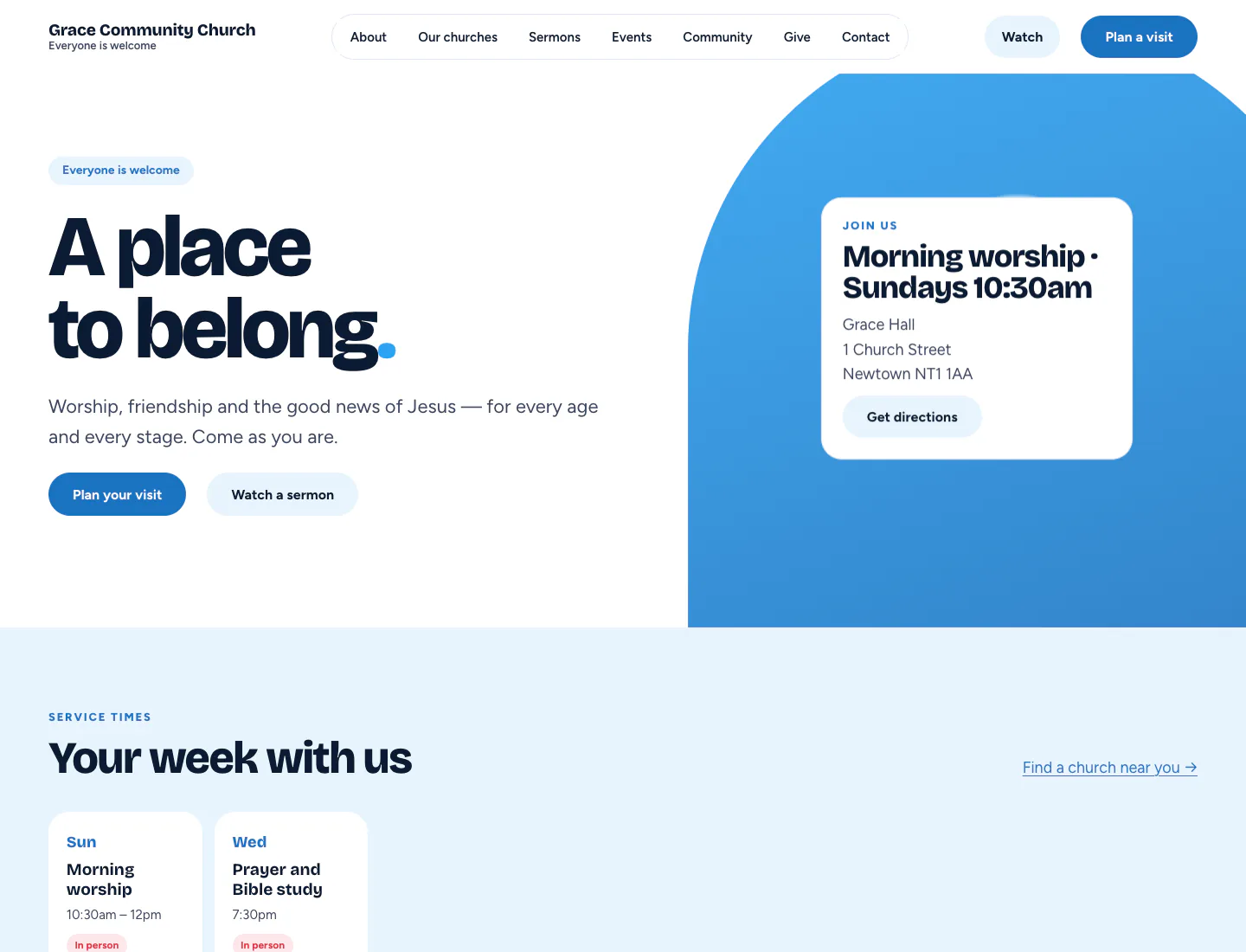
Church home page in the Gathering design on desktop: hero “A place to belong” with service-time card, Plan your visit and Watch a sermon buttons, and this week’s service times
After the setup wizard, with its sample content (Gathering design). Yours shows your own words and pictures.

Gradespace Charity

Charities and community organisations

Your three files, in order

  1. Gradespace Core plugingradespace-core-0.8.7.zip
  2. Gradespace Charity plugingradespace-charity-0.1.5.zip
  3. Gradespace Charity themegradespace-charity-theme-0.1.6.zip

The setup wizard asks about

  • Your business
  • How people reach you
  • Your charity
  • Donations
  • Volunteering
  • Starter content

Afterwards everything is under Charity in the WordPress menu, and your licence under Charity → Settings → Licence.

Charity needs Gradespace Core 0.8.0 or later (its booking engine and booking groups, used for shifts and several shifts in one go).

Donate buttons go to your page on your donation provider: paste it in Charity → Settings → Donations. It must start with https:// and be on the provider’s own website. Each campaign can have its own page.

The wizard asks for your registered charity number, company number and registered office, and every footer shows them. The sample services, roles, shifts, campaign, event and story are off by default.

Shifts, routing to each place’s coordinator, calendar feeds and campaign update emails need Pro. Moving back to Starter loses nothing: shifts, places and supporters stay in wp-admin.

Staff guide

Signing in, the Today screen, campaigns and their totals, donations, volunteers, shifts and the rota, events, places, services, stories and reports, your charity’s details, the newsletter, records and privacy, and who can do what.

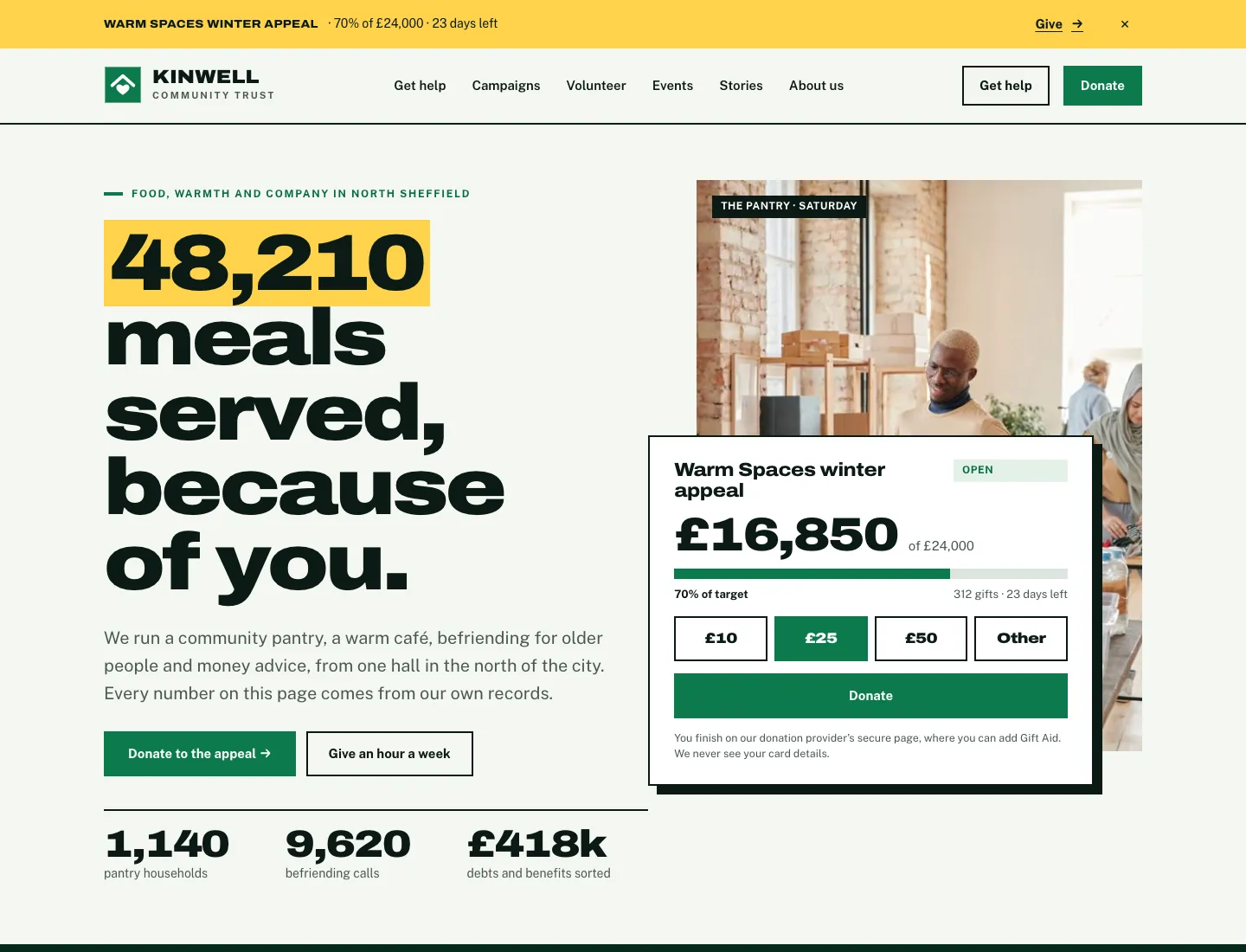
Charity home page in the Impact design on desktop: the appeal strip with its live percentage and Give, a big headline taken from the annual report’s first figure, Donate to the appeal and Give an hour a week, the year’s figures, and the live campaign card with amount buttons over a photo
After the setup wizard, with its sample content (Impact design). Yours shows your own words and pictures.

Gradespace Venue

Wedding, event and meeting venues

Your three files, in order

  1. Gradespace Core plugingradespace-core-0.8.7.zip
  2. Gradespace Venue plugingradespace-venue-0.1.5.zip
  3. Gradespace Venue themegradespace-venue-theme-0.1.4.zip

The setup wizard asks about

  • Your business
  • How people reach you
  • Your venue
  • Enquiries and holds
  • Viewings
  • Starter content

Afterwards everything is under Venue in the WordPress menu, and your licence under Venue → Settings → Licence.

Venue needs Gradespace Core 0.7.1 or later (its booking engine, payments and forms).

“One event at a time (exclusive use)” is on to start with: a booking takes the whole venue. Turn it off under Venue → Settings → Your venue if you hire rooms separately.

People can ask about several dates in one enquiry (up to seven to start with). Change it under Venue → Settings → Your venue → “Dates in one enquiry (up to)”; 1 turns it off.

Deposits (Pro) need online payments set up under Settings → Payments, then switched on under Settings → Deposits.

Staff guide

Signing in, the Today screen, the diary, enquiries and their stages, holds, viewings, deposits, spaces, prices and the rest of the website, diary feeds, records and privacy, and settings.

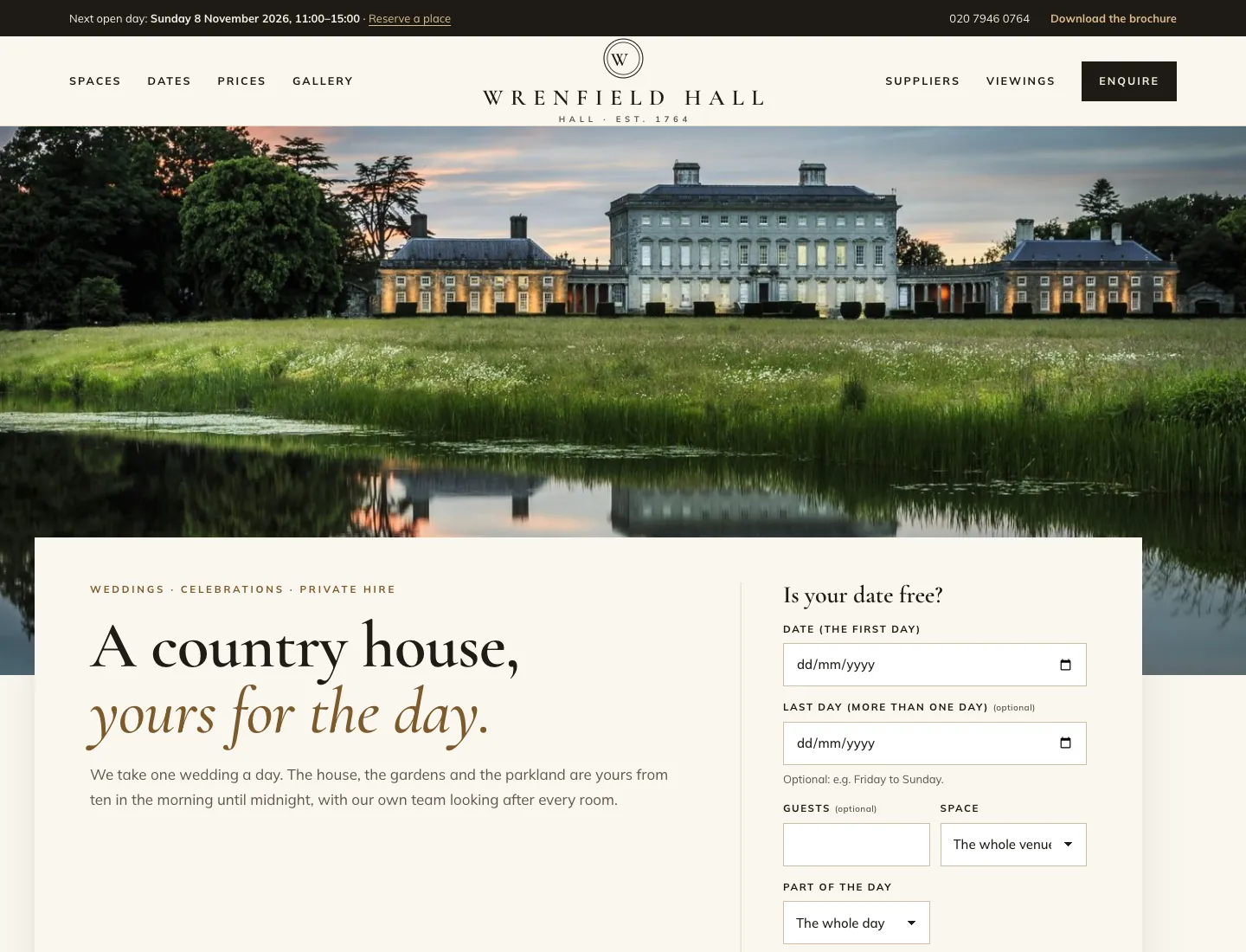
Venue home page in the Estate design on desktop: the next open day and “Download the brochure” in a top bar, the Wrenfield Hall crest with the menu either side, a full-width photo of the house across a lake, and “A country house, yours for the day.” beside “Is your date free?” with date, guests, space and part of the day
After the setup wizard, with its sample content (Estate design). Yours shows your own words and pictures.

Gradespace Trades

Builders, plumbers, electricians and other trades

Your three files, in order

  1. Gradespace Core plugingradespace-core-0.8.7.zip
  2. Gradespace Trades plugingradespace-trades-0.1.4.zip
  3. Gradespace Trades themegradespace-trades-theme-0.1.4.zip

The setup wizard asks about

  • Your business
  • How people reach you
  • Your trade
  • Where you work
  • Quote requests
  • Accreditations
  • Starter content

Afterwards everything is under Trades in the WordPress menu, and your licence under Trades → Settings → Licence.

Trades needs Gradespace Core 0.7.1 or later.

The towns you add in the wizard (or with Add areas from a list) become draft area pages. Write a few sentences of each town’s own before you publish it: pages without their own words are flagged and kept out of search engines.

Accreditations are added as text. Upload the logo each scheme gave you, your number and a link to check it under Trades → Accreditations.

Quotes, survey visits and review emails (Pro) are set up in Trades → Settings → Quotes, Survey visits and Reviews. Review links work on every tier.

Staff guide

Signing in, the Today screen, quote requests and the pipeline, quotes, survey visits, reviews, services, service areas, projects and accreditations, and personal data.

Trades home page in the Workshop design on desktop: a yellow emergency call-out strip, “Broken? Leaking? No heating? We’re on it.” in condensed capitals on charcoal, a large Call now button with the phone number, Free quote, the star rating, Fixed price and No call-out fee, and a photo of an engineer with “Next free engineer: today or tomorrow”
After the setup wizard, with its sample content (Workshop design). Yours shows your own words and pictures.

Gradespace Group

Groups of businesses under one owner

Your three files, in order

  1. Gradespace Core plugingradespace-core-0.8.7.zip
  2. Gradespace Group plugingradespace-group-0.1.6.zip
  3. Gradespace Group themegradespace-group-theme-0.1.2.zip

The setup wizard asks about

  • Your business
  • How people reach you
  • Your group
  • Your businesses
  • How they look
  • Starter content

Afterwards everything is under Group in the WordPress menu, and your licence under Group → Settings → Licence.

Group needs Gradespace Core 0.7.1 or later.

Add a business any time: Group → Businesses → Add New, or run the setup wizard again and click Add another business. It appears on the homepage, the menu and the contact form straight away.

One brand for the whole group comes with every tier. Each business in its own brand (Pro) is in Group → Settings → Group → Display mode, with a preview first.

WooCommerce is optional: with it, shop orders show in the client area (Pro) next to the orders your staff record.

Staff guide

Signing in, the Today screen, your businesses, enquiries, listings, stock and equipment, clients with their orders, invoices and plans, who sees what, and the design.

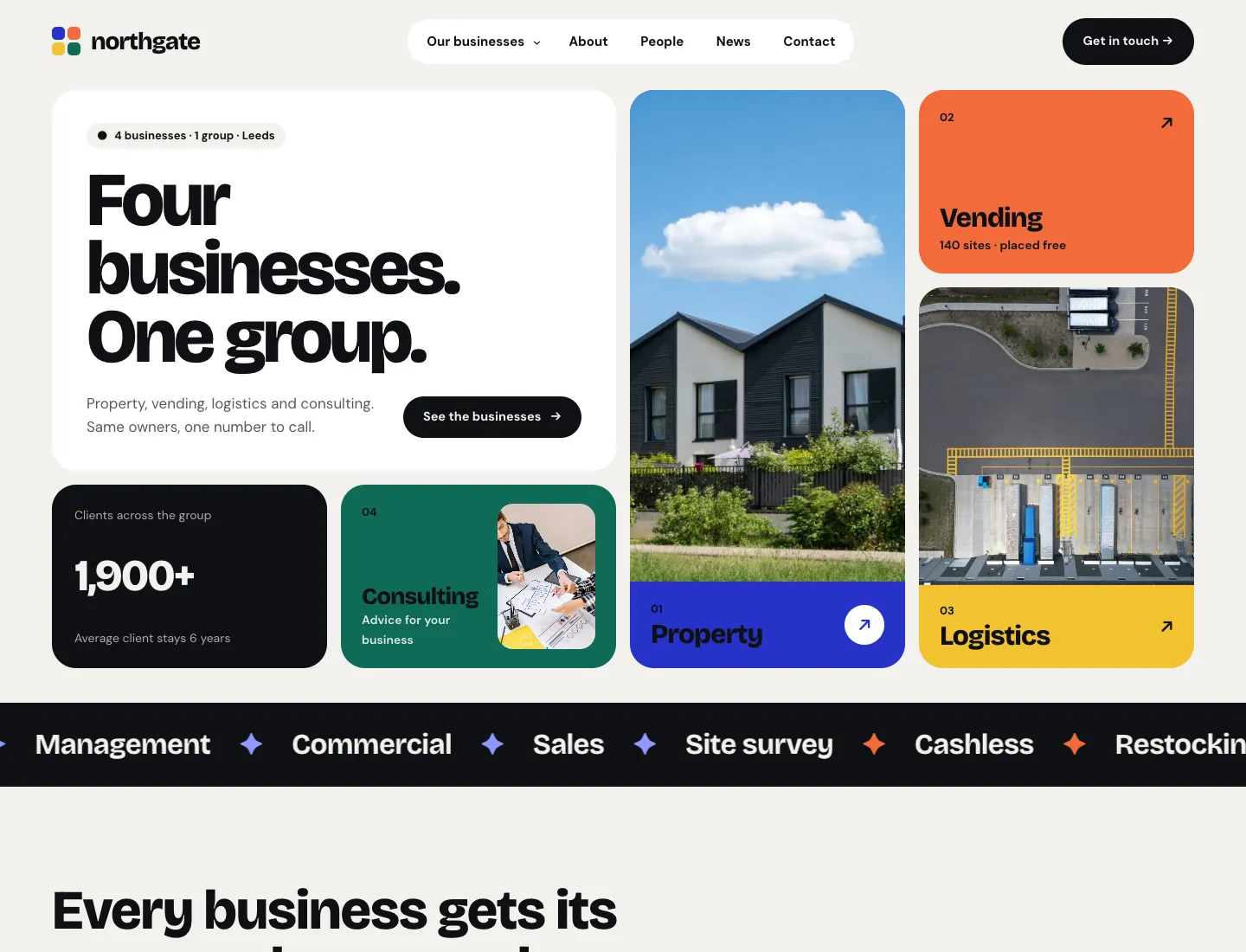
Group home page in the Mosaic design on desktop: “Four businesses. One group.” in a bento grid with colour cards for Property, Vending, Logistics and Consulting, a client count and a ticker of services
After the setup wizard, with its sample content (Mosaic design). Yours shows your own words and pictures.

Moving to another website

A licence covers one live website at a time (Agency covers 5). To move it:

  1. On the old website, go to Settings → Gradespace licence and click Deactivate on this website. If the old site has already gone, choose Remove site next to it on your licences page instead.
  2. On the new website, install as above and activate the same key in Settings → Gradespace licence.

Nothing you saved is deleted when you deactivate a key.

Local and staging sites

Copies for building and testing don’t count towards your licence, so you can try things on a copy, then go live. These addresses are free:

  • localhost
  • ….local
  • ….test
  • ….localhost
  • staging.…
  • dev.…

They get the full features of your licence and show as “Local or staging, free” on your licences page.

Updates

Once your key is active, new versions of Gradespace Core, your kit’s plugin and its theme appear in Dashboard → Updates. Click Update, as you would for any plugin. Updates are included for life, with no renewals. View details on the Plugins screen shows what changed.

Getting help

Stuck, or something looks wrong? Tell us what you were doing, what you expected, and send a screenshot. Lost your key? Look it up on your licences page with the email address you bought with.